A family-history app by CodeFarmer

Your family’s story.
Still growing.

See the connections. Follow the evidence. Bring the people and stories that make you you together.

iPhone · iPad · Duo
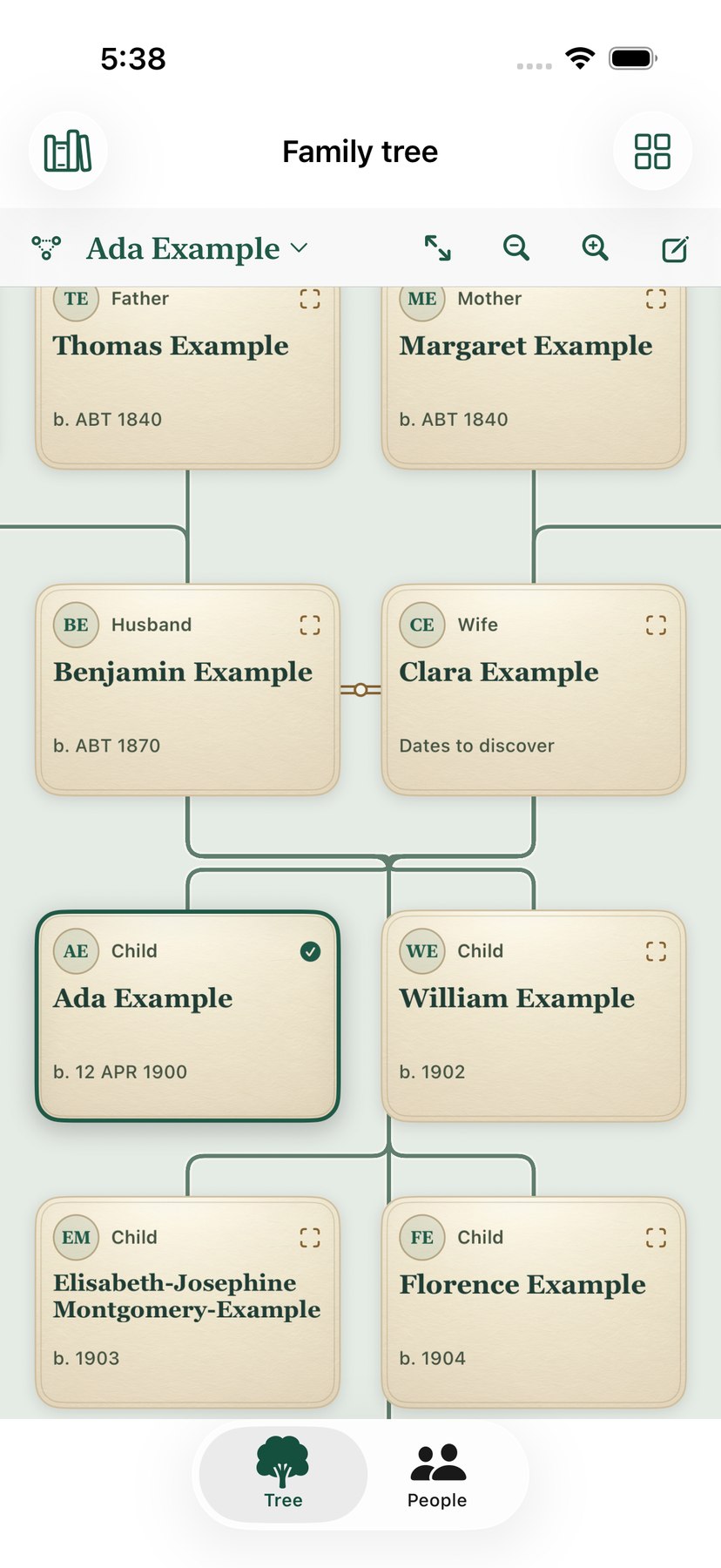
The Lineage Grove family tree showing Ada Example, her parents, grandparents and siblings.
A family, beautifully connected.
01See the whole family02Know where a fact came from03Choose what you share

A story worth getting right

A name is a start.
Evidence adds depth.

Bring your curiosity or let assisted research gather possibilities. Keep the source, compare the claims and decide what becomes part of your family history.

  1. 01

    Ask a good question

    Set a research goal for a person. Record searches that find a clue—and searches that find nothing.

  2. 02

    Keep the evidence close

    Attach sources and quotations. Preserve competing claims and explain why a conclusion makes sense.

  3. 03

    Approve what changes

    Review proposed facts and incoming trees. Confirm identities, resolve differences and preview the result.
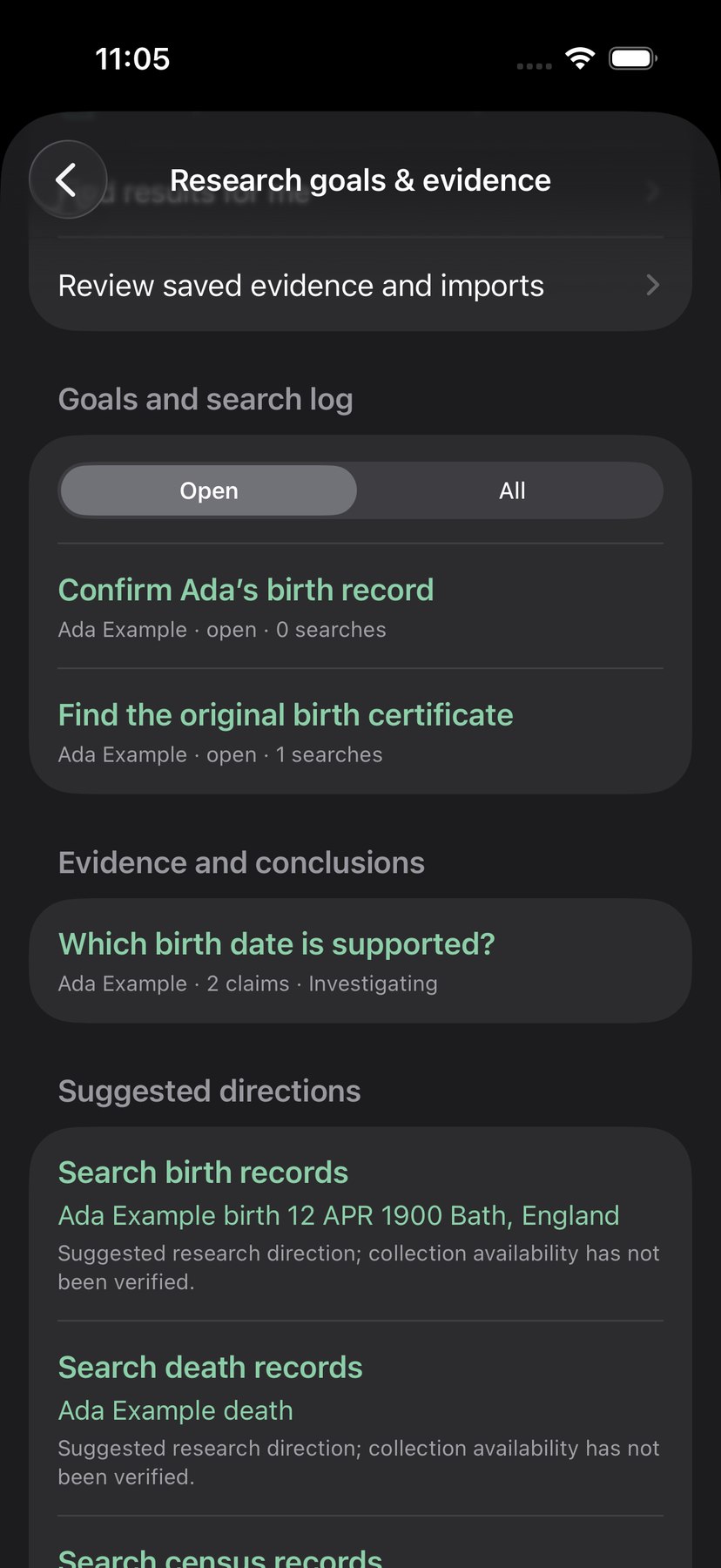
Research goals, evidence cases and suggested research directions for Ada Example in the app’s dark appearance.

A conclusion keeps its reasons.
A contribution keeps its receipt.

Families discover more together

Your history.
Your circle. Your choice.

Coordinate discoveries through iCloud. Choose the audience, inspect an incoming branch and approve what joins your tree.

A cousin brings 1,200 new people?

Review the contribution.
Keep the context.

See how many people are new, confirm matches, choose a batch and inspect conflicting facts. Final approval is yours. Receipts preserve the contributor, evidence and decisions so you can reconsider a contribution later.

Explore comparison & recovery

Made to be kept. Made to be shared.

More than a tree.
A family archive.

Faces. Places. Memories.

Connect photos and documents to people. Identify faces in a group photograph, choose a portrait and keep the original image.

A history you can hold.

Print ancestors, descendants or a family. Make charts, lists, detailed reports, books and albums. Preview a PDF before sharing.

A wider sense of place.

Explore recorded locations and family migration. Add a dated historical map, calibrate it and explore events through time.

A short introduction

Meet Lineage Grove.

Listen to an overview of the family tree, research and sharing experience.

Read the transcript

Every family has a story. Lineage Grove helps you see how it all connects. Explore husbands, wives, parents and children together. Pinch to discover more generations and tap a relative to bring their family into focus. Your family history feels close, wherever you take it.

Bring in a tree file and its memories. Keep photos, facts and sources together. Set a research goal, compare the evidence and record why a conclusion makes sense. When a cousin shares something new, review the people, inspect the differences and choose what belongs in your tree.

Choose how your history travels. Keep it private, invite selected relatives, or publish eligible ancestor summaries for discovery. Preserve a backup, print a family chart, or share a report.

Learn by doing

See how it works

Follow a fictional family through five short walkthroughs.

Meet Lineage Grove

Explore the tree, compare evidence and make a family chart.

Read the narration

Every family has a story. Lineage Grove gives yours a place to grow. See parents, spouses, and children together. Follow a branch across generations, or open a person's record to add a date, a photograph, or a source. When someone sends their tree, compare it with yours and decide what belongs in your history. Then make a chart you can share, print, and keep.

Import a family tree

Review a genealogy file before adding an editable copy.

Read the narration

Open a genealogy export from Files. In Lineage Grove, the preview shows the people, families, and any missing attachments. Approve it to create a working copy. Lineage Grove makes a separate copy. Open that tree to explore the family, or compare it with an existing tree.

Add a spouse or child

Connect relatives from the family view and see them together.

Read the narration

Tap a relative to center their family. Tap them again to open their record. Add a date, place, or source. Choose Add Relative to connect a spouse, parent, sibling, or child. Check the details and tap Save.

Review a family contribution

Choose which facts to keep and approve the merge when ready.

Read the narration

When a relative shares a tree, see where your histories overlap. Compare the evidence side by side. Choose which details to keep, then approve the changes you want in your own tree.

Print or share a branch

Choose a branch, preview the PDF and open printing or sharing.

Read the narration

Open Publish and choose a branch. Start with one person’s ancestors, descendants, or immediate family. Pick a chart style and preview the pages. Share the PDF through the system share sheet, save a copy in Files, or open print options for your next family gathering.

Bring the work you’ve already done

A new home.
A familiar history.

Start with a supported tree export, bring the accompanying media and inspect what arrived. Your original files stay separate from the editable working copy.

See import routes
Family Tree MakerRootsMagicReunionMacFamilyTreeHeredisLegacyFamily HistorianGramps
Use the supported exchange route.

GEDCOM, supported Gramps exports, media packages and Lineage Grove archives provide import options. Other products generally need a GEDCOM export and permitted media files. Exact coverage depends on the format and version; inspect the fidelity report. Proprietary native formats and direct account synchronization have separate support requirements.

Research websites may require an account or subscription. Direct public searches are available for supported collections; website links and permitted exports are distinct from provider account synchronization. Product names identify exchange sources, not endorsements or partnerships.

For a quick look or a deep investigation

Room to grow
your research.

Explore the full capability guide. Choose a category or search for the tool you need.

81 capabilities across 12 categories

Explore your family08
  • Families togetherSee spouses, parents and children connected in the family view.
  • Generations at a pinchZoom out to reveal more relatives; pan, fit the view and zoom back in.
  • Tap to follow a branchTap another person to recenter; tap the selected person again for their record.
  • A choice of chartsExplore family, ancestor, descendant, hourglass, bowtie, fan, pedigree and extended-family layouts.
  • Find a personSearch the people list and open a relative’s place in the tree.
  • Follow a connectionTrace a recorded relationship between two people.
  • Your preferred viewChoose chart appearance, spacing, line treatment and lineage colors.
  • Explore a branch in 3DUse on-screen 3D to explore a family. Optional tabletop placement uses the camera on supported devices.
People, families & facts07
  • Editable life storiesEdit names, dates, places, facts, notes and family relationships.
  • Historical date detailRetain the wording and uncertainty of recorded genealogical dates.
  • Preferred factsReview alternative recorded values and choose preferred facts.
  • Shared events & witnessesConnect participants and recorded roles to one cited event.
  • Reusable notesKeep shared notes and formatted research notes with the tree.
  • Organize your peopleUse saved searches, filters, selected people and configurable people-index fields.
  • AnniversariesExplore birthdays and anniversaries from recorded dates.
Research your way08
  • Guided or hands-onChoose Research myself or Find results for me, then review what you find.
  • Goals & questionsSet a person-specific research question; pause, resolve or reopen it.
  • Search historyLog provider, collection, query, date and outcome, including searches that found nothing.
  • Saved research runsResume saved research and inspect findings in the research inbox.
  • Open collection searchesSearch supported public Library of Congress, Internet Archive, Wikidata and WikiTree resources.
  • Europeana accessUse your authorized access key for supported Europeana research.
  • Website researchOpen Ancestry, FamilySearch, MyHeritage, Findmypast and other research websites; bring back permitted evidence.
  • Profile connectionsSave provider profile links and keep the last-review context with a person.
Evidence & conclusions06
  • Competing claimsKeep alternative, preferred, undecided and rejected claims in an evidence case.
  • Quotations & reasonsRecord source quotations, your assessment and the reason for a conclusion.
  • Sources & citationsCreate source records, use citation templates and review where citations are used.
  • Separate approvalPrepare a conclusion as a proposed fact, then approve the recorded-tree change separately.
  • Data qualityReview duplicates, incomplete references, statistics and consistency findings.
  • Careful bulk editsPreview find-and-replace changes, spelling review and fact-copy operations.
Bring your history07
  • GEDCOM exchangeImport supported GEDCOM trees and preserve unfamiliar structures for review.
  • Gramps exchangeOpen supported Gramps XML and package exports.
  • Archives & mediaBring in supported media ZIP packages and portable Lineage Grove archives.
  • Share-sheet inboxReceive selected files, links, text and permitted documents from Files, Safari or Mail.
  • PDFs, text & scansExtract readable text from supported documents and scans; review suggested facts before import.
  • Fidelity inspectionInspect people, families, sources, citations, media, missing files and unresolved pointers.
  • Migration choicesUse supported export routes from Family Tree Maker, RootsMagic, Reunion, MacFamilyTree, Heredis, Legacy and Family Historian.
Compare & combine07
  • Check the overlapCompare an incoming tree against a chosen destination and review suggested identities.
  • Choose matching peopleConfirm identities and explicitly approve new people.
  • Resolve differencesReview conflicting facts and choose the changes you accept.
  • Large contributionsInspect addition counts and select a batch of new people before final approval.
  • Preview the resultSee the proposed additions and resolved differences before applying a merge.
  • Keep the receiptPreserve contributor, source and decision history with an approved contribution.
  • Reconsider a contributionInspect receipts and use guarded undo while the saved result remains eligible.
Share on your terms09
  • A private starting pointKeep your working history local and choose your iCloud and publication settings.
  • Your Apple devicesSync supported tree and photo changes through iCloud, with an offline working copy.
  • Selected invitationsInvite chosen relatives to a whole tree and choose available read or editing permissions.
  • Public ancestor discoveryOpt in to publishing eligible ancestor summaries; public projection excludes living, uncertain and restricted people.
  • Permission requestsAllow people to ask to view your history or coordinate a merge.
  • Public-tree matchesSearch intentionally published trees and compare a relevant snapshot before approval.
  • Cousins nearbyStart an explicit nearby exchange and review the received contribution.
  • A family browser pageExport a privacy-reviewed portable page relatives can browse and use to propose corrections.
  • Native sharingShare supported files, reports and archives through the iOS share sheet.
Print, publish & export08
  • A branch or the wider treeChoose ancestors, descendants, a family, selected people or the visible tree area.
  • Charts, lists & detailsPrepare a chart, a people list or a detailed family-history report.
  • PDF & printingPreview a PDF, use system printing and share the resulting publication.
  • Posters & tiled sheetsChoose a fitted page, poster PDF or tiled chart sheets.
  • Books & albumsCompose genealogy books, photo albums, chapter text and reusable publication settings.
  • Design controlsAdjust chart typography, spacing, pictures, text objects and report fields.
  • Portable text & dataExport supported text, CSV and genealogy exchange files; the chosen format determines retained detail.
  • Calendar exportsCreate supported anniversary and family-calendar publications.
Photos, documents & stories06
  • A connected archiveAttach photos, documents, captions and stories to the people they describe.
  • People in group photosMark a face region and explicitly associate it with a person.
  • On-device face regionsAsk for face-region suggestions on the device, then assign each identity yourself.
  • Derived portraitsChoose a face crop as a portrait while retaining the attached original image.
  • Media organizationReview missing files, attachments, duplicates and working-copy storage.
  • Photo edits & storiesCreate derived photo adjustments and compose illustrated family stories.
Places & historical context04
  • Place index & mapsOrganize recorded places, review locations and resolve place names.
  • Family migrationExplore recorded family locations and migration information on maps.
  • Historical map layersAdd a local dated map image and calibrate its geographic bounds.
  • Events through timeExplore dated events alongside a family atlas and historical context.
DNA research04
  • Private match recordsRecord a match label, provider, shared centimorgans, proposed relationship and notes.
  • Reviewed CSV intakeStage the documented match CSV format and approve selected entries.
  • Chromosome segmentsRecord GRCh37 or GRCh38 segment coordinates and inspect same-assembly overlaps.
  • Permission to shareRecord per-match permission and choose consented exports; whole-tree invitations also require match permission.
Preserve & keep learning07
  • Working copiesKeep imported originals separate from the app’s editable working history.
  • Backups & versionsCreate supported local or iCloud backups and inspect saved versions.
  • Restore as a copyRecover supported backups as a separate tree for inspection.
  • Conflicting cloud versionsKeep differing device and cloud versions available for review.
  • Undo & redoUse available editing history and guarded contribution recovery.
  • A guided walkthroughFollow replayable lessons and practice with a separate fictional family.
  • Research utilitiesUse genealogy calculators, tree policies, storage review and in-app guidance.

Feature guide for the current beta. Internet access and an iCloud account are needed for cloud features. DNA coordinate overlaps support research; they do not establish a family relationship. The exported browser page is a portable snapshot; later iCloud edits do not update it.

A few things you might wonder

Start with
what you know.

How do I start?

Look for a known ancestor in intentionally shared public trees or research websites, or import a supported tree file. A replayable guide and a separate fictional practice family help you learn the tools.

Will importing change my original file?

The app creates an editable working copy. Keep your original export and media as a backup, inspect the import and approve what you bring into a working tree.

Does it automatically merge someone else’s tree?

You review the comparison. Confirm shared identities, choose additions, resolve conflicts and approve the final result. A receipt preserves the contribution and your decisions.

Can I use it privately?

Yes. Choose local working history and your own iCloud settings. Public ancestor discovery is an explicit choice. Review whole-tree invitation permissions separately from privacy-filtered snapshots.

Can relatives help from a browser?

Share a privacy-reviewed portable family page. Relatives can browse its people and download proposed corrections to send back for native comparison and approval. This exported page is a snapshot rather than a live web editor.

Can I connect my Ancestry or FamilySearch account?

You can research on the source website and bring permitted exports, links and evidence into review. Approved provider account synchronization is a separate integration; a website link or paid subscription does not activate it inside Lineage Grove.

What can I print or share?

Prepare ancestors, descendants, a family, selected people or a visible tree area. Choose supported charts, lists, detailed reports, books or albums, preview the result and use system printing or the share sheet.

Which devices does the app support?

Lineage Grove targets iPhone and iPad on iOS and iPadOS 17 or later. Its responsive interface also supports Duo layouts. The gallery uses actual beta captures from iPhone, iPad and an expanded Duo; supported layouts continue to be qualified during beta.

Your next chapter

A little closer
to your roots.

Start a tree, bring in your existing research, and keep the people and records behind your family story together.

Available on the App Store · Version 1.0

Start free with up to 20 people in one editable tree. A one-time Pro purchase unlocks more editing, publishing, and collaboration tools.

App screenshot